
Audi MMI Software & Map Update Checker

This free online tool helps you instantly discover the latest MMI firmware and map updates for your Audi. Simply check your current MMI version to reveal available upgrades.

How It Works

  1. Locate your current MMI version
    • Access the Red Engineering Menu in your Audi MMI system (commonly by long-pressing the “Setup” or “Menu” button).
    • In the Red Menu, find the Media Version (e.g. MMI 3G Plus – Media Version) myaudi.org.
    • Example version format: HN+_EU_AU3G_K0942_3 (Use underscores; no spaces.)
  2. Enter your software version
    • Submit your current version in the form below to check for available software or map updates.
  3. Review available updates
    • The tool will display the latest official MMI firmware and map packages supported for your version and region.
  4. Download update packages
    • Download the correct update ZIP files directly from our server.
    • Each package is labeled for your Audi model and region for easy identification.
  5. Install the update
    • Transfer downloaded files to a FAT32-formatted USB or SD card.
    • Insert into your Audi’s MMI system.
    • Navigate: MMI Settings → System Update and follow onscreen instructions.

Benefits of Using This Update Checker

  • Fast & Accurate: Instantly verifies the latest update for your specific MMI version and region.
  • Simple Instructions: No guesswork—update files are clearly labeled and ready to download.
  • Safe & Compatible: Avoids mismatches by providing only compatible firmware and map versions.
  • DIY-Friendly: Full guidance on locating version info and performing updates yourself.

Quick Tips

  • Firmware files follow this naming convention:
    HN+_EU_AU3G_K0942_3 (do not add spaces—use underscores only.)
  • FAT32 is required; 16GB USB drives / SD CARDs are recommended for map and firmware packages.
  • Keep your car engine on or battery charged to prevent power loss during installation.
  • If the Red Engineering Menu isn’t accessible, try long-press methods or check our manuals.

Related Guides & Tools

Browse our freestanding resources to support every update step:

  • How to identify your MMI version
  • Unpacking firmware update files
  • Activate the hidden Green Engineering Menu
  • Step-by-step firmware update for MMI 3G, MMI 3G Plus, MIB2, and MMI 2G High
  • Map update guides by model: A1/A3/A4/A5/A6/A7/A8/Q2/Q3/Q5/Q7/Q8/R8/TT (EU, US, Rest of World)
  • Apple CarPlay & Android Auto activation tools for MMI MIB2

Summary

Use our streamlined Audi MMI Software & Map Update Checker to:

  • Instantly identify available updates
  • Download the correct firmware and map files
  • Follow simple installation steps
  • Keep your MMI infotainment system current, safe, and functioning at its best

Save time and worry—get the right update, hassle-free.


Need Help?

Have questions or require guidance with your update? Visit our Help Center or reach out directly via Contact Us.

All you need is to find out your current MMI software version, usually you can find it in Red Engineering Menu, more about how to find that, you can find on this manual (click)
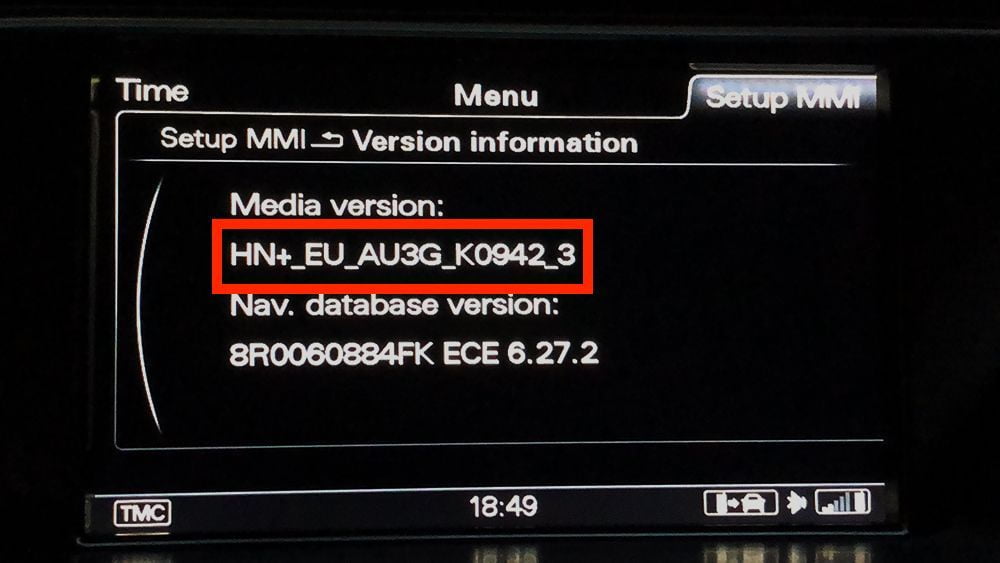
MMI 3G Plus - Media version
MMI 3G Plus – Media version

In above photo we have highlighted MMI 3G Plus software version. You need to rewrite whole that version for EXAMPLE: HN+_EU_AU3G_K0942_3

do not use space instead of underscore_.

Check update

Your current version: